User Partial Update
When using User Federation (LDAP), user attributes like username and email are typically managed by the external system. However, you may still want to manage realm roles, client roles, and groups via keycloak-config-cli. The user partial update feature allows you to specify which user properties should be ignored during updates, enabling you to selectively manage only the aspects of users that you control.
Related issues: #910
The Problem
Users with LDAP federation encounter challenges because: - Usernames and emails are managed by LDAP, not Keycloak - Importing user configurations tries to update all properties - LDAP-synchronized attributes conflict with configuration file values - Cannot manage roles/groups without affecting username/email - Full user imports overwrite LDAP-provided attributes - Need granular control over which user properties to update
- Need granular control over which user properties to update
Understanding User Partial Update
What is User Partial Update?
User partial update allows you to specify a list of user properties that should be ignored during the update process. When a property is in the ignored list: - The property value from the import file is not applied - The existing value in Keycloak remains unchanged - Other properties (not in the list) are updated normally
Properties That Can Be Ignored
| Property | Description | Common LDAP-Managed |
|---|---|---|
username |
User's login name | Yes |
email |
User's email address | Yes |
firstName |
User's first name | Sometimes |
lastName |
User's last name | Sometimes |
enabled |
Whether user is active | No |
attributes |
Custom user attributes | Sometimes |
Configuration
Basic Usage
java -jar keycloak-config-cli.jar \
  --keycloak.url=http://localhost:8080 \
  --keycloak.user=admin \
  --keycloak.password=admin \
  --import.behaviors.user-update-ignored-properties=username,email,firstName,lastName \
  --import.files.locations=path/to/config-file
Environment Variable
export IMPORT_BEHAVIORS_USERUPDATEIGNOREDPROPERTIES=username,email,firstName,lastName

java -jar keycloak-config-cli.jar \
  --import.files.locations=path/to/config-file
Use Cases
Use Case 1: LDAP-Managed Attributes with CLI-Managed Roles
Scenario: User attributes come from LDAP, but roles are managed via keycloak-config-cli.
LDAP provides: username, email, firstName, lastName
CLI manages: realmRoles, clientRoles, groups
Important: Users reference realm roles, client roles, and groups which must exist first. Either import them separately first or include them in the same file.
Configuration file: path/to/config-file
{
  "realm": "corporate",
  "roles": {
    "realm": [
      { "name": "employee" },
      { "name": "developer" }
    ],
    "client": {
      "app-backend": [
        { "name": "read", "clientRole": true },
        { "name": "write", "clientRole": true }
      ]
    }
  },
  "clients": [
    {
      "clientId": "app-backend",
      "enabled": true,
      "protocol": "openid-connect"
    }
  ],
  "groups": [
    { "name": "engineering" },
    { "name": "project-alpha" }
  ],
  "users": [
    {
      "username": "john.doe",
      "email": "john.doe@company.com",
      "firstName": "John",
      "lastName": "Doe",
      "enabled": true,
      "realmRoles": ["employee", "developer"],
      "clientRoles": {
        "app-backend": ["read", "write"]
      },
      "groups": ["engineering", "project-alpha"]
    }
  ]
}
Import with ignored properties:
java -jar keycloak-config-cli.jar \
  --keycloak.url=http://localhost:8080 \
  --keycloak.user=admin \
  --keycloak.password=admin \
  --import.remote-state.enabled=true \
  --import.behaviors.user-update-ignored-properties=username,email,firstName,lastName \
  --import.files.locations=user-roles.json
Result: - username, email, firstName, lastName: Unchanged (kept from LDAP) - realmRoles, clientRoles, groups: Updated from config file - enabled: Updated from config file (not in ignore list)
- enabled: Updated from config file (not in ignore list)
Use Case 2: Minimal Role Assignment File
Scenario: You only want to assign roles without specifying user attributes.
Configuration file: add-admin-role.json
{
  "realm": "corporate",
  "roles": {
    "realm": [
      { "name": "admin" }
    ]
  },
  "users": [
    {
      "username": "jane.smith",
      "realmRoles": ["admin"]
    }
  ]
}
Import:
java -jar keycloak-config-cli.jar \
  --keycloak.url=http://localhost:8080 \
  --keycloak.user=admin \
  --keycloak.password=admin \
  --import.remote-state.enabled=true \
  --import.behaviors.user-update-ignored-properties=username,email,firstName,lastName,enabled \
  --import.files.locations=path/to/config-file
Result: - Only the "admin" role is added to user "jane.smith" - All other user attributes remain unchanged
Use Case 3: Progressive Permission Management
Scenario: Different teams manage different aspects of user permissions.
Step 1: HR team sets base attributes (if not using LDAP)
# Full import without ignored properties
java -jar keycloak-config-cli.jar \
  --keycloak.url=http://localhost:8080 \
  --keycloak.user=admin \
  --keycloak.password=admin \
  --import.remote-state.enabled=true \
  --import.files.locations=path/to/config-file
Step 2: Security team adds roles (ignoring personal attributes)
java -jar keycloak-config-cli.jar \
  --keycloak.url=http://localhost:8080 \
  --keycloak.user=admin \
  --keycloak.password=admin \
  --import.remote-state.enabled=true \
  --import.behaviors.user-update-ignored-properties=username,email,firstName,lastName \
  --import.files.locations=path/to/config-file
Step 3: Project team adds project-specific groups
java -jar keycloak-config-cli.jar \
  --keycloak.url=http://localhost:8080 \
  --keycloak.user=admin \
  --keycloak.password=admin \
  --import.remote-state.enabled=true \
  --import.behaviors.user-update-ignored-properties=username,email,firstName,lastName \
  --import.files.locations=project-groups.json
Complete Examples
Example 1: LDAP Federation Setup
Docker Compose with LDAP:
services:
  keycloak:
    image: quay.io/keycloak/keycloak:26.4.0
    environment:
      KEYCLOAK_ADMIN: admin
      KEYCLOAK_ADMIN_PASSWORD: admin
    ports:
      - "8080:8080"
    command: ["start-dev"]
Import script: import-roles.sh
# Import only roles and groups, ignore LDAP-managed attributes
java -jar keycloak-config-cli.jar \
  --keycloak.url=http://localhost:8080 \
  --keycloak.user=admin \
  --keycloak.password=admin \
  --import.remote-state.enabled=true \
  --import.behaviors.user-update-ignored-properties=username,email,firstName,lastName \
  --import.files.locations="$1"
Example 2: Combining with Merge Behavior
Scenario: Add roles without removing existing ones AND ignore LDAP attributes.
java -jar keycloak-config-cli.jar \
  --keycloak.url=http://localhost:8080 \
  --keycloak.user=admin \
  --keycloak.password=admin \
  --import.behaviors.user-update-ignored-properties=username,email,firstName,lastName \
  --import.behaviors.merge-users-realm-roles=true \
  --import.behaviors.merge-users-groups=true \
  --import.files.locations=path/to/config-file
Configuration file: path/to/config-file
{
  "realm": "corporate",
  "roles": {
    "realm": [
      { "name": "temporary-project-access" }
    ]
  },
  "groups": [
    { "name": "project-beta" }
  ],
  "users": [
    {
      "username": "john.doe",
      "realmRoles": ["temporary-project-access"],
      "groups": ["project-beta"]
    }
  ]
}
Result: - LDAP attributes (username, email, name) remain unchanged - "temporary-project-access" role is added (not replacing existing) - "project-beta" group is added (not removing existing groups)
Example 3: Single Property Update
Scenario: Only update the enabled status, leave everything else unchanged.
java -jar keycloak-config-cli.jar \
  --keycloak.url=http://localhost:8080 \
  --keycloak.user=admin \
  --keycloak.password=admin \
  --import.behaviors.user-update-ignored-properties=username,email,firstName,lastName,realmRoles,clientRoles,groups,attributes \
  --import.files.locations=path/to/config-file
Configuration file: path/to/config-file
Result:
- Only the enabled status is updated
- All other properties remain exactly as they were
Example 4: Selectively Updating Attributes (Not Ignored)
Scenario: You want to update email and firstName while keeping LDAP-managed username and lastName unchanged.
Configuration file: path/to/config-file
{
  "realm": "corporate",
  "users": [
    {
      "username": "john.doe",
      "email": "new.email@company.com",
      "firstName": "Johnny",
      "lastName": "Doe",
      "enabled": true
    }
  ]
}
Import - Only ignore username and lastName:
java -jar keycloak-config-cli.jar \
  --keycloak.url=http://localhost:8080 \
  --keycloak.user=admin \
  --keycloak.password=admin \
  --import.behaviors.user-update-ignored-properties=username,lastName \
  --import.files.locations=path/to/config-file
Result:
- username: Unchanged (ignored - kept from LDAP)
- email: UPDATED to "new.email@company.com" (not ignored)
- firstName: UPDATED to "Johnny" (not ignored)
- lastName: Unchanged (ignored - kept from LDAP)
- enabled: UPDATED to true (not ignored)
Key Point: Only properties in the ignore list remain unchanged. Properties NOT in the list are updated from the config file.
Example 5: Full Update Without Any Ignored Properties
Scenario: You want to update ALL user properties (no LDAP - all managed by CLI).
Configuration file: path/to/config-file
{
  "realm": "corporate",
  "roles": {
    "realm": [
      { "name": "developer" }
    ]
  },
  "users": [
    {
      "username": "john.doe",
      "email": "updated@company.com",
      "firstName": "John",
      "lastName": "Smith",
      "enabled": true,
      "realmRoles": ["developer"]
    }
  ]
}
Import - No ignored properties:
java -jar keycloak-config-cli.jar \
  --keycloak.url=http://localhost:8080 \
  --keycloak.user=admin \
  --keycloak.password=admin \
  --import.files.locations=path/to/config-file
Result: - ALL properties updated from config file - email changed to "updated@company.com" - lastName changed to "Smith" - realmRoles set to ["developer"]
Step-by-Step Example: Partial User Update
This example demonstrates how to update a user's email address while ensuring other attributes (like firstName and lastName) remain untouched, even if they are present in the import file.
Step 1: Initial User Creation
First, we create a user with their initial attributes.
Configuration (user-initial.json):
{
  "realm": "example",
  "enabled": true,
  "users": [
    {
      "username": "tester",
      "email": "initial@example.com",
      "firstName": "Initial",
      "lastName": "User",
      "enabled": true
    }
  ]
}
Import Command:
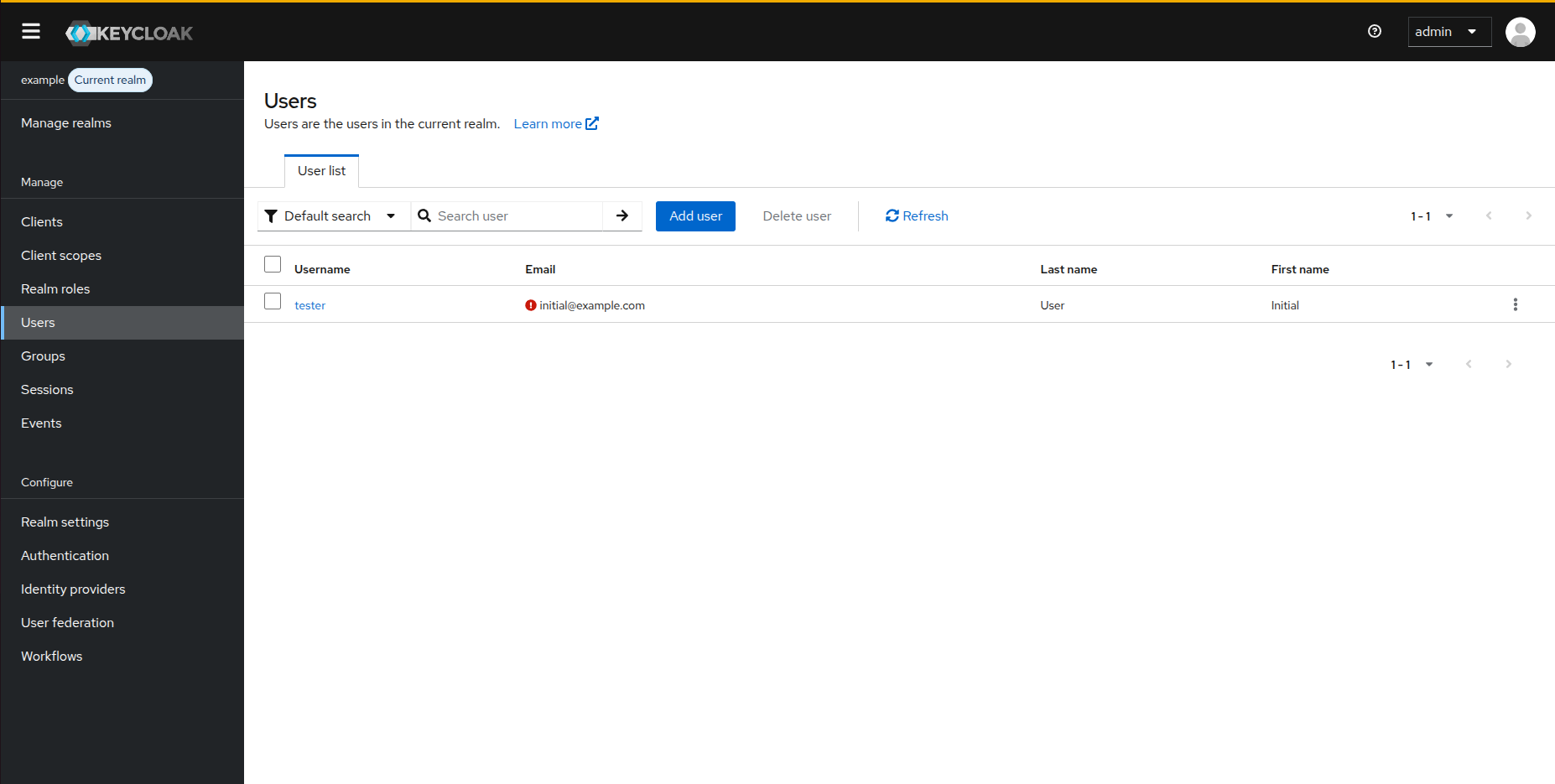 Figure 1: Initial user state in Keycloak after the first import.
Step 2: Partial Update (Updating Email Only)
Next, we prepare an update file that contains a new email address but also has "wrong" values for firstName and lastName. By using the user-update-ignored-properties flag, we ensure only the email is updated.
Update Configuration (user-update.json):
{
  "realm": "example",
  "enabled": true,
  "users": [
    {
      "username": "tester",
      "email": "updated@example.com",
      "firstName": "ThisShouldBeIgnored",
      "lastName": "ThisShouldBeIgnored"
    }
  ]
}
Partial Update Command:
java -jar keycloak-config-cli.jar \
  --import.behaviors.user-update-ignored-properties=firstName,lastName \
  --import.files.locations=user-update.json
Result:
- email: Updated to updated@example.com
- firstName: Remains Initial (ignored)
- lastName: Remains User (ignored)
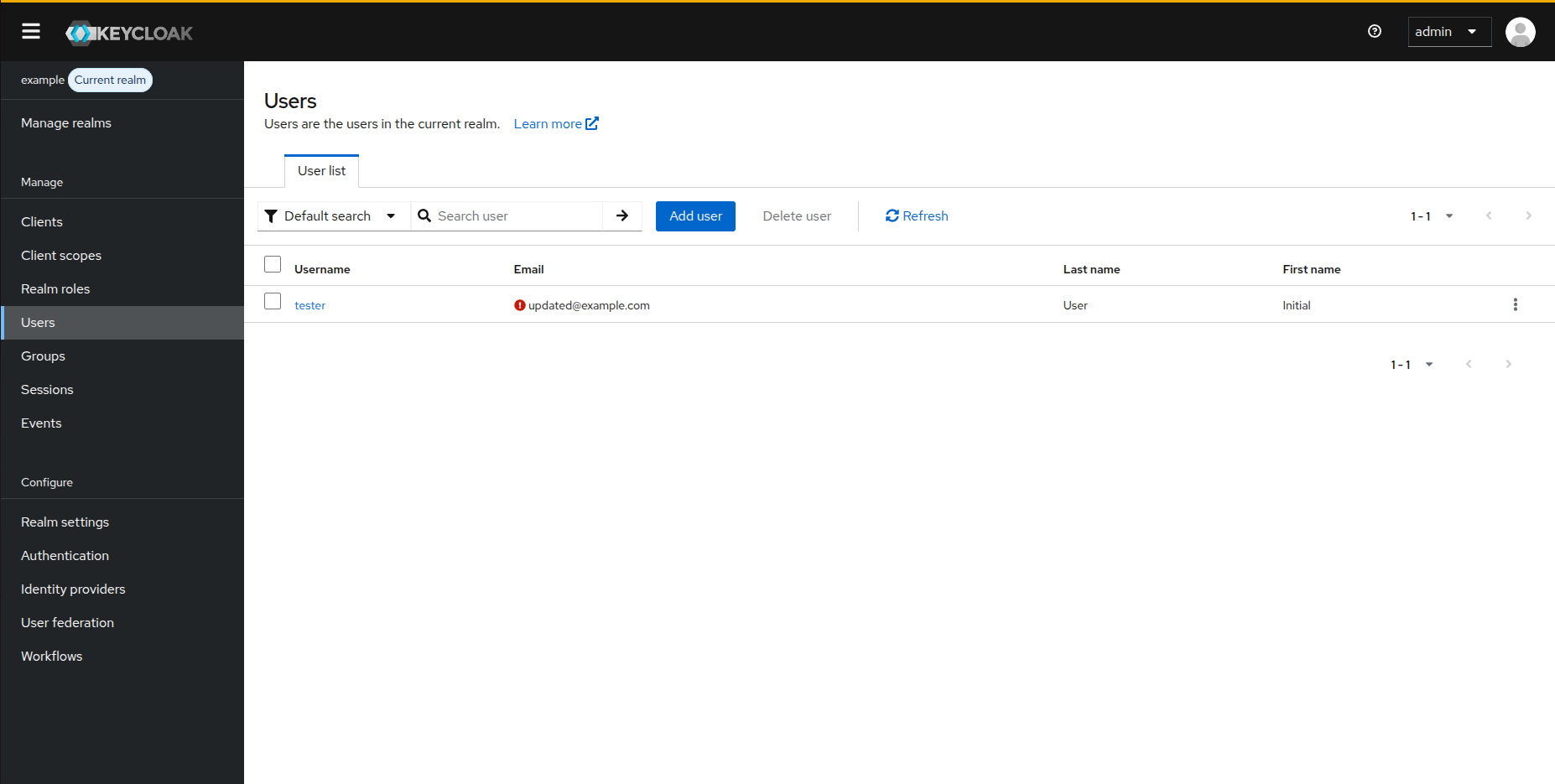 Figure 2: User state after partial update. Note that the email is updated, but names remain unchanged despite the update file.
Common Pitfalls
1. Ignoring Required Properties
Problem:
But the config file has a different username:
Result: The username lookup uses "different-name" but the actual user's username remains unchanged. This can cause confusion or errors if the username doesn't match.
Solution: Always use the correct username (as stored in Keycloak) in your config file:
2. Forgetting to Enable When Needed
Problem:
# No ignored properties set
java -jar keycloak-config-cli.jar \
  --import.files.locations=path/to/config-file
Result: LDAP-synchronized attributes are overwritten, causing conflicts.
Solution: Always set ignored properties when managing LDAP users:
java -jar keycloak-config-cli.jar \
  --import.behaviors.user-update-ignored-properties=username,email,firstName,lastName \
  --import.files.locations=path/to/config-file
3. Inconsistent Property Lists
Problem: Different import runs use different ignore lists:
Run 1:
Run 2:
Result: firstName and lastName from Run 1 are overwritten in Run 2.
Solution: Use consistent ignore lists or document when they differ:
# Create reusable scripts
./import-roles.sh    # Always ignores username,email,firstName,lastName
./import-attributes.sh  # Only ignores username,email
4. Missing Role, Group, or Client Dependencies
Problem:
{
  "realm": "corporate",
  "users": [
    {
      "username": "john",
      "realmRoles": ["manager"],
      "clientRoles": {
        "app-backend": ["read"]
      },
      "groups": ["engineering"]
    }
  ]
}
Possible Errors:
- Could not find role 'manager' in realm 'corporate'!
- Cannot find client by clientId 'app-backend'
- Could not find group 'engineering' in realm 'corporate'!
Cause: Users reference resources (roles, clients, groups) that must exist before the user import.
Solution: Define all dependencies before users:
{
  "realm": "corporate",
  "roles": {
    "realm": [
      { "name": "manager" }
    ],
    "client": {
      "app-backend": [
        { "name": "read", "clientRole": true },
        { "name": "write", "clientRole": true }
      ]
    }
  },
  "clients": [
    {
      "clientId": "app-backend",
      "enabled": true
    }
  ],
  "groups": [
    { "name": "engineering" }
  ],
  "users": [
    {
      "username": "john",
      "realmRoles": ["manager"],
      "clientRoles": {
        "app-backend": ["read"]
      },
      "groups": ["engineering"]
    }
  ]
}
Or import in dependency order:
# 1. Import clients and roles first
java -jar keycloak-config-cli.jar \
  --import.files.locations=clients-and-roles.json

# 2. Then import users that reference them
java -jar keycloak-config-cli.jar \
  --import.files.locations=users-with-roles.json
5. Expecting Properties to Be Updated When Ignored
Problem:
With config:
Expectation: Email should be updated to new value.
Reality: Email is ignored, remains unchanged.
Solution: Remove from ignore list if you want to update:
# Don't include email in ignored properties
--import.behaviors.user-update-ignored-properties=username,firstName,lastName
Best Practices
-
Document Your LDAP Strategy
-
Use Consistent Ignore Lists
-
Combine with Remote State
-
Validate Before Import
-
Version Control Configuration
-
Audit User Changes Regularly review which properties are being managed by CLI vs LDAP.
Comparison with Merge Behavior
| Feature | User Partial Update (Ignore) | Merge Behavior |
|---|---|---|
| What it does | Ignores specified properties | Adds roles/groups without removing |
| Use with LDAP | Yes - prevent overwriting LDAP attrs | Optional - for incremental role assignment |
| Properties affected | Any user property (username, email, etc.) | Only realmRoles, groups, clientRoles |
| Can be combined | Yes - use both together | Use both for full LDAP compatibility |
Combined Usage
java -jar keycloak-config-cli.jar \
  --import.behaviors.user-update-ignored-properties=username,email,firstName,lastName \
  --import.behaviors.merge-users-realm-roles=true \
  --import.behaviors.merge-users-groups=true \
  --import.files.locations=path/to/config-file
Configuration Options Reference
# Ignore specific properties
--import.behaviors.user-update-ignored-properties=username,email

# Ignore all personal attributes (typical LDAP setup)
--import.behaviors.user-update-ignored-properties=username,email,firstName,lastName

# Ignore everything except roles and groups
--import.behaviors.user-update-ignored-properties=username,email,firstName,lastName,enabled,attributes

# Combine with merge for comprehensive partial updates
--import.behaviors.user-update-ignored-properties=username,email,firstName,lastName \
--import.behaviors.merge-users-realm-roles=true \
--import.behaviors.merge-users-groups=true
Troubleshooting
User Properties Being Overwritten
Symptom: LDAP-managed attributes (email, name) are being changed by keycloak-config-cli.
Diagnosis:
Check if user-update-ignored-properties is set:
Solution:
java -jar keycloak-config-cli.jar \
  --import.behaviors.user-update-ignored-properties=username,email,firstName,lastName \
  --import.files.locations=path/to/config-file
User Not Found
Symptom: "User not found" error when importing.
Cause: The username in config file doesn't match the actual username (because it's ignored).
Solution: Use the actual username as stored in Keycloak:
Changes Not Applied
Symptom: Import succeeds but no changes visible.
Diagnosis: Check if all relevant properties are in the ignore list.
Solution: Review and adjust the ignore list:
# Too restrictive - ignores everything
--import.behaviors.user-update-ignored-properties=username,email,firstName,lastName,realmRoles,groups

# Better - only ignore LDAP-managed attributes
--import.behaviors.user-update-ignored-properties=username,email,firstName,lastName
Related Issues
- #910 - Add support for partial update of users
- #1293 - Add the ability to merge users realmRoles and groups
- #1132 - User update without groups deletes previously set groups
Additional Resources
- User Roles and Groups Merge - For additive role/group management
- User Group Update Behavior - Understanding group update behavior
- Partial Imports - General partial import documentation
- LDAP Integration - Keycloak LDAP federation guide