File Operations
File operations in variable substitution allow you to read content from files, properties files, resource bundles, and XML documents to dynamically populate your Keycloak configuration.
Overview
File operations enable you to: - Read entire file contents - Extract specific values from properties files - Access resource bundle values - Query XML documents using XPath - Handle different character encodings
File Content
Basic File Reading
Read the entire content of a file:
{
  "realm": "$(file:UTF-8:src/test/resources/document.properties)",
  "displayName": "$(file:UTF-8:/path/to/display-name.txt)"
}
Syntax
Parameters:
- ENCODING - Character encoding (e.g., UTF-8, ISO-8859-1)
- PATH - File path (relative or absolute)
Examples
Reading a realm name from file:
Reading a secret from file:
Using absolute path with system property:
Properties File
Reading Properties
Extract specific values from Java properties files:
{
  "realm": "$(properties:config/application.properties::realm.name)",
  "displayName": "$(properties:config/application.properties::app.display.name)"
}
Syntax
Parameters:
- FILE_PATH - Path to the properties file
- KEY - Property key to extract
Properties File Example
application.properties:
realm.name=production-realm
app.display.name=My Application
keycloak.url=https://keycloak.company.com
admin.email=admin@company.com
Configuration:
{
  "realm": "$(properties:config/application.properties::realm.name)",
  "displayName": "$(properties:config/application.properties::app.display.name)",
  "attributes": {
    "keycloak_url": "$(properties:config/application.properties::keycloak.url)",
    "admin_email": "$(properties:config/application.properties::admin.email)"
  }
}
Multiple Properties
You can read multiple properties from the same file:
{
  "realm": "$(properties:config/realm.properties::name)",
  "enabled": "$(properties:config/realm.properties::enabled)",
  "sslRequired": "$(properties:config/realm.properties::ssl.required)"
}
XML XPath
Querying XML Documents
Extract values from XML documents using XPath expressions:
{
  "realm": "$(xml:config/realm-config.xml:/realm/@name)",
  "displayName": "$(xml:config/realm-config.xml:/realm/displayName)"
}
Syntax
Parameters:
- FILE_PATH - Path to the XML file
- EXPRESSION - XPath expression to evaluate
XML Document Example
realm-config.xml:
<?xml version="1.0" encoding="UTF-8"?>
<realm name="production-realm">
  <displayName>Production Realm</displayName>
  <settings>
    <sslRequired>external</sslRequired>
    <registrationAllowed>false</registrationAllowed>
  </settings>
  <attributes>
    <attribute name="environment">production</attribute>
    <attribute name="region">us-east-1</attribute>
  </attributes>
</realm>
Configuration:
{
  "realm": "$(xml:config/realm-config.xml:/realm/@name)",
  "displayName": "$(xml:config/realm-config.xml:/realm/displayName)",
  "sslRequired": "$(xml:config/realm-config.xml:/realm/settings/sslRequired)",
  "registrationAllowed": "$(xml:config/realm-config.xml:/realm/settings/registrationAllowed)"
}
Advanced XPath Examples
Extract attributes:
{
  "realm": "$(xml:config/config.xml:/configuration/realm/@id)",
  "enabled": "$(xml:config/config.xml:/configuration/realm/@enabled)"
}
Extract nested elements:
Extract list values:
Character Encodings
Common Encodings
UTF-8 (Recommended):
ISO-8859-1:
US-ASCII:
Encoding Best Practices
- Use UTF-8: Default to UTF-8 for maximum compatibility
- Match File Encoding: Ensure encoding matches the actual file encoding
- Test Special Characters: Verify special characters render correctly
- Document Encoding: Document the encoding used for each file
Security Considerations
Sensitive Files
Never commit sensitive files:
add to the .gitignore
Use secure file locations:
File Permissions
Ensure proper file permissions:
Restrict access to sensitive files
Complete Import Example
This example demonstrates all file operations working together: file reading, properties extraction, and XML querying.
Step 1: Create Supporting Files
realm-name.txt
application.properties
realm.display.name=File Operations Demo
app.redirect.uris=http://localhost:8080/callback,http://localhost:8080/silent-renew
client.secret=file-operations-secret-123
ssl.required=external
registration.allowed=false
realm-config.xml
<?xml version="1.0" encoding="UTF-8"?>
<realm name="file-operations-realm" enabled="true">
  <displayName>File Operations Demo Realm</displayName>
  <settings>
    <sslRequired>external</sslRequired>
    <registrationAllowed>false</registrationAllowed>
    <passwordPolicy>length(8) and upperCase(1) and digits(1)</passwordPolicy>
  </settings>
  <attributes>
    <attribute name="environment">demo</attribute>
    <attribute name="region">eu-west-1</attribute>
    <attribute name="version">1.0.0</attribute>
  </attributes>
</realm>
client-secret.txt
Step 2: Create Realm Configuration
file-operations-realm.json
{
  "realm": "$(file:UTF-8:/path/to/config/realm-name.txt)",
  "displayName": "$(properties:/path/to/config/application.properties::realm.display.name)",
  "enabled": "$(xml:/path/to/config/realm-config.xml:/realm/@enabled)",
  "sslRequired": "$(xml:/path/to/config/realm-config.xml:/realm/settings/sslRequired)",
  "registrationAllowed": "$(xml:/path/to/config/realm-config.xml:/realm/settings/registrationAllowed)",
  "passwordPolicy": "$(xml:/path/to/config/realm-config.xml:/realm/settings/passwordPolicy)",
  "internationalizationEnabled": true,
  "attributes": {
    "welcome_message": "Welcome to the File Operations Demo!",
    "realm_description": "This realm demonstrates file, properties, and XML operations",
    "environment": "demo",
    "region": "eu-west-1",
    "version": "1.0.0",
    "file_based_config": "true"
  },
  "roles": {
    "realm": [
      {
        "name": "user",
        "description": "Regular user role from file operations demo"
      },
      {
        "name": "admin",
        "description": "Administrator role from file operations demo"
      }
    ]
  },
  "users": [
    {
      "username": "file-demo-user",
      "email": "file-demo@example.com",
      "enabled": true,
      "firstName": "File",
      "lastName": "Demo",
      "realmRoles": ["user"],
      "credentials": [
        {
          "type": "password",
          "value": "Demo12345",
          "temporary": false
        }
      ]
    }
  ],
  "clients": [
    {
      "clientId": "file-operations-client",
      "name": "File Operations Demo",
      "description": "Demo client with file-based configuration",
      "enabled": true,
      "publicClient": false,
      "standardFlowEnabled": true,
      "directAccessGrantsEnabled": true,
      "secret": "$(file:UTF-8:/path/to/secrets/client-secret.txt)",
      "redirectUris": ["http://localhost:8080/callback", "http://localhost:8080/silent-renew"],
      "webOrigins": ["http://localhost:8080"]
    }
  ]
}
Step 3: Run Import
java -jar keycloak-config-cli.jar \
  --keycloak.url=http://localhost:8080 \
  --keycloak.user=admin \
  --keycloak.password=admin \
  --import.var-substitution.enabled=true \
  --import.files.locations=file-operations-realm.json
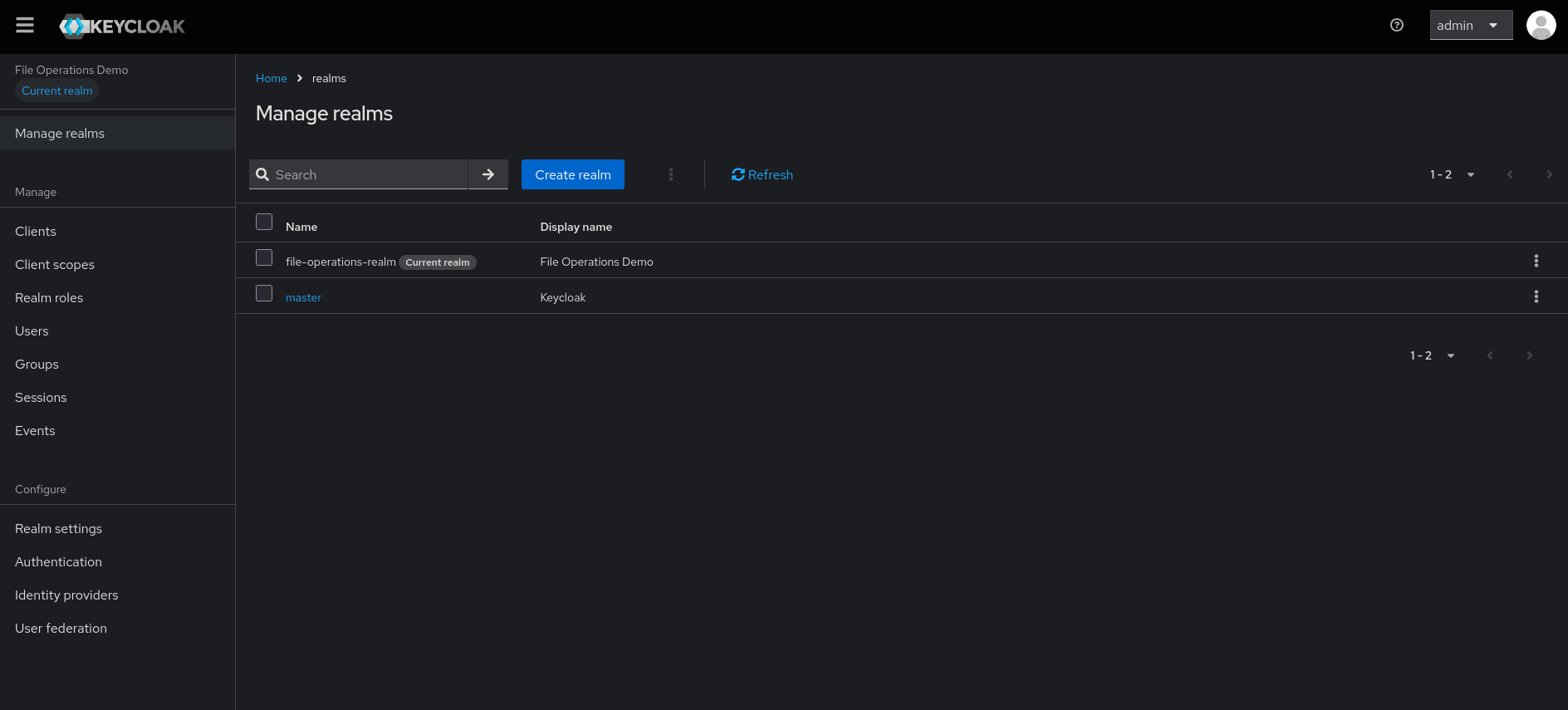
Step 4: Verify Results
Expected Results
In the Keycloak Admin Console, verify:
- Realm name:
file-operations-realm(from text file) - Display name:
File Operations Demo(from properties file) - Realm enabled:
true(from XML attribute) - SSL required:
external(from XML element) - Registration allowed:
false(from XML element) - Password policy:
length(8) and upperCase(1) and digits(1)(from XML element) - Client secret:
super-secret-client-password-456(from secret file) - User:
file-demo-usercreated successfully - Roles:
userandadminroles created
What This Demonstrates
- File Content Reading: Reading realm name from text file
- Properties Extraction: Extracting display name from properties file
- XML Attribute Query: Getting realm enabled status from XML attribute
- XML Element Query: Extracting settings from XML elements
- Secret Management: Reading client secret from secure file
- Mixed Operations: Combining all file operation types in one configuration
Next Steps
- Overview - Variable substitution introduction
- Environment Variables - Environment variable access
- JavaScript Substitution - Advanced JavaScript evaluation
- Encoding & Decoding - Base64 and URL operations