Client Authorization Import Order
When importing Keycloak client authorization settings, the order in which resources, scopes, and policies are created matters. Prior to version 6.4.1, scopes needed to be created before resources could bind to them, and groups needed to exist before group policies could reference them. Understanding the correct import order prevents HTTP 403 errors and ensures proper authorization configuration.
1. The Problem
Users encountered authorization import failures because: - Resources tried to bind to scopes that didn't exist yet - Group policies referenced groups that weren't created yet - Import order was incorrect (resources before scopes) - HTTP 403 errors occurred when evaluating permissions - Authorization settings failed silently or partially - Scopes were not properly bound to resources - Group policies remained unlinked to actual groups
2. Understanding Authorization Components
Authorization Service Components
- Scopes - Actions that can be performed (GET, POST, PUT, DELETE)
- Resources - Protected resources with URIs
- Policies - Rules that define access (user, role, group, time, etc.)
- Permissions - Link between resources/scopes and policies
Correct Import Order
Before Fix (Caused Errors): 1. Resources (trying to bind to non-existent scopes) 2. Scopes (created after resources) 3. Policies (referencing non-existent groups)
After Fix (Correct Order): 1. Groups (must exist first) 2. Scopes (must exist before resources) 3. Resources (can now bind to scopes) 4. Policies (can now reference groups) 5. Permissions (can now reference resources and policies)
3. The Fix (PR #1444)
What Changed
Before (v6.4.0 and earlier): - Import order: Resources → Scopes → Policies - Resources couldn't bind to scopes (scopes didn't exist yet) - Group policies couldn't reference groups
After (v6.4.1+): - Import order: Scopes → Resources → Policies - Scopes created first, resources can bind to them - Groups validated before group policies created
Import Order in Code
The fix ensures this order in ClientAuthorizationImportService:
- Scopes - Created first
- Resources - Created second (can now reference scopes)
- Policies - Created third (can now reference groups)
- Permissions - Created last (can reference everything)
4. Complete Working Example
Full Configuration with Authorization
{
  "realm": "simple",
  "enabled": true,
  "groups": [
    {
      "name": "Employee"
    },
    {
      "name": "Admin"
    },
    {
      "name": "NotAdmin"
    }
  ],
  "users": [
    {
      "username": "admin-user",
      "enabled": true,
      "credentials": [
        {
          "type": "password",
          "value": "password",
          "temporary": false
        }
      ],
      "groups": [
        "/Admin"
      ]
    },
    {
      "username": "regular-user",
      "enabled": true,
      "credentials": [
        {
          "type": "password",
          "value": "password",
          "temporary": false
        }
      ],
      "groups": [
        "/Employee"
      ]
    }
  ],
  "clients": [
    {
      "clientId": "simple-client",
      "name": "simple-client",
      "enabled": true,
      "clientAuthenticatorType": "client-secret",
      "secret": "nv6V42dsKJNotHereMyFriendmzZqabcd",
      "serviceAccountsEnabled": true,
      "authorizationServicesEnabled": true,
      "authorizationSettings": {
        "allowRemoteResourceManagement": false,
        "policyEnforcementMode": "ENFORCING",
        "decisionStrategy": "AFFIRMATIVE",
        "scopes": [
          { "name": "GET" },
          { "name": "POST" },
          { "name": "PUT" },
          { "name": "DELETE" }
        ],
        "resources": [
          {
            "name": "Default Resource",
            "uris": ["/*"],
            "scopes": [
              { "name": "DELETE" },
              { "name": "GET" },
              { "name": "POST" },
              { "name": "PUT" }
            ]
          }
        ],
        "policies": [
          {
            "name": "Admin Group Policy",
            "type": "group",
            "logic": "POSITIVE",
            "decisionStrategy": "UNANIMOUS",
            "config": {
              "groups": "[{\"path\":\"/Admin\",\"extendChildren\":false}]"
            }
          },
          {
            "name": "Default Resource Permission",
            "type": "resource",
            "logic": "POSITIVE",
            "decisionStrategy": "AFFIRMATIVE",
            "config": {
              "applyPolicies": "[\"Admin Group Policy\"]"
            }
          }
        ]
      }
    }
  ]
}
Visual Verification Steps
To ensure your authorization configuration is properly imported, verify the following in the Keycloak Admin Console:
Step 1: Verify Authorization Services are Enabled
Go to Clients -> simple-client -> Settings -> Capability config, and ensure "Authorization" is ON.

Step 2: Verify Scopes are Created
Navigate to the Authorization -> Authorization Scopes tab for the client.
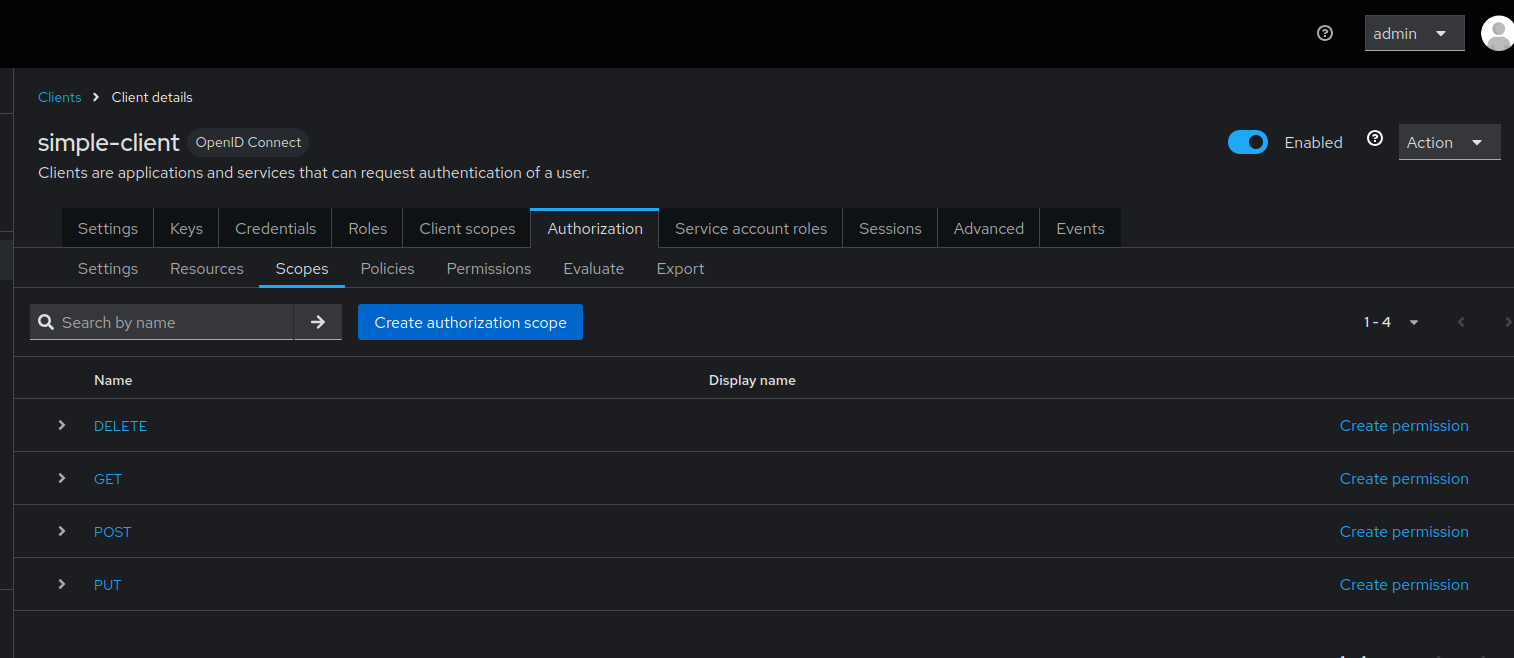
Step 3: Verify Resources and Scope Bindings
Navigate to the Authorization -> Resources tab for the client. Click on a resource to verify its scopes are bound.
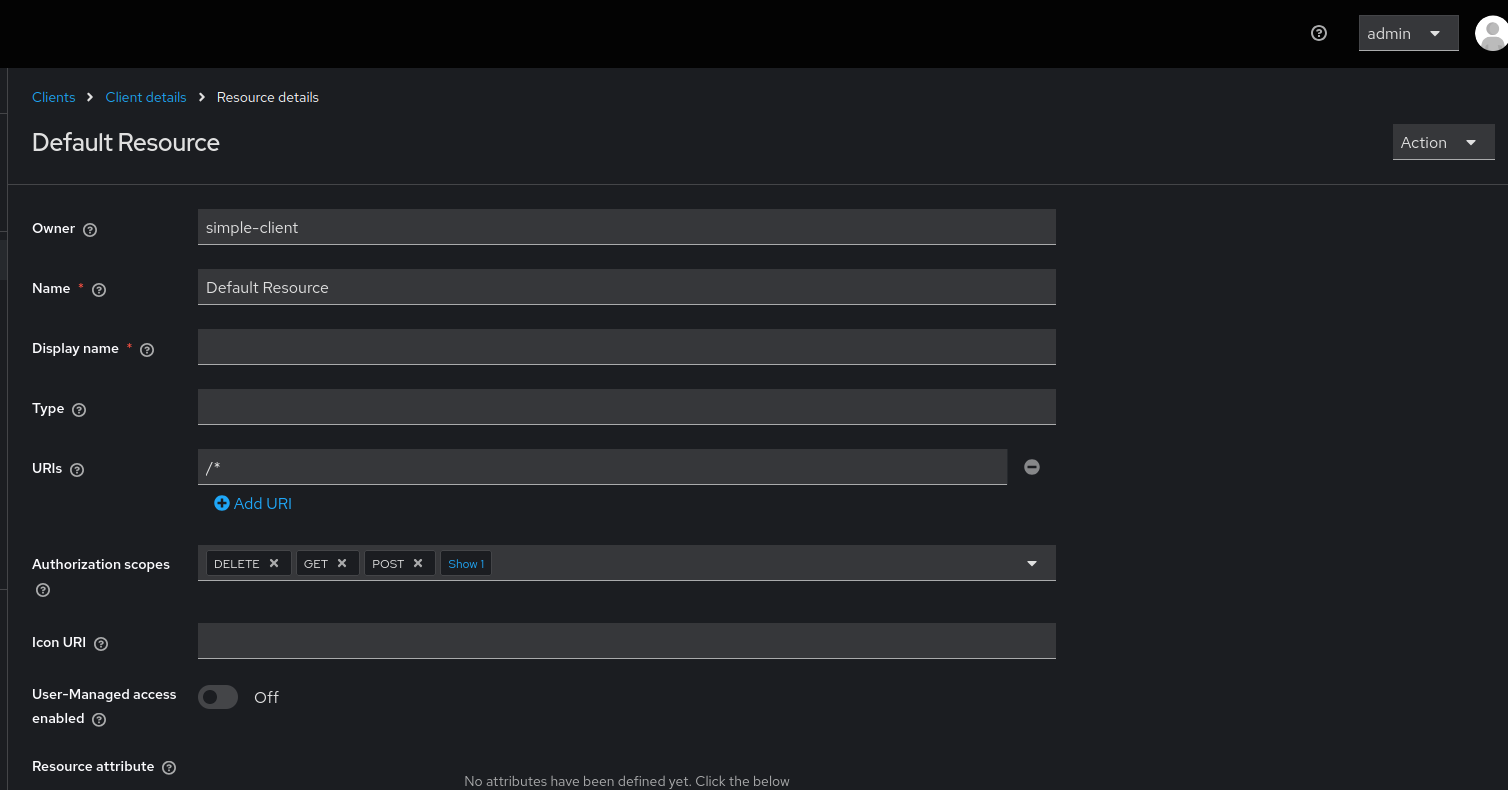
Step 4: Verify Policies and Permissions
Navigate to the Authorization -> Policies and Authorization -> Permissions tabs to ensure they are created and linked properly.
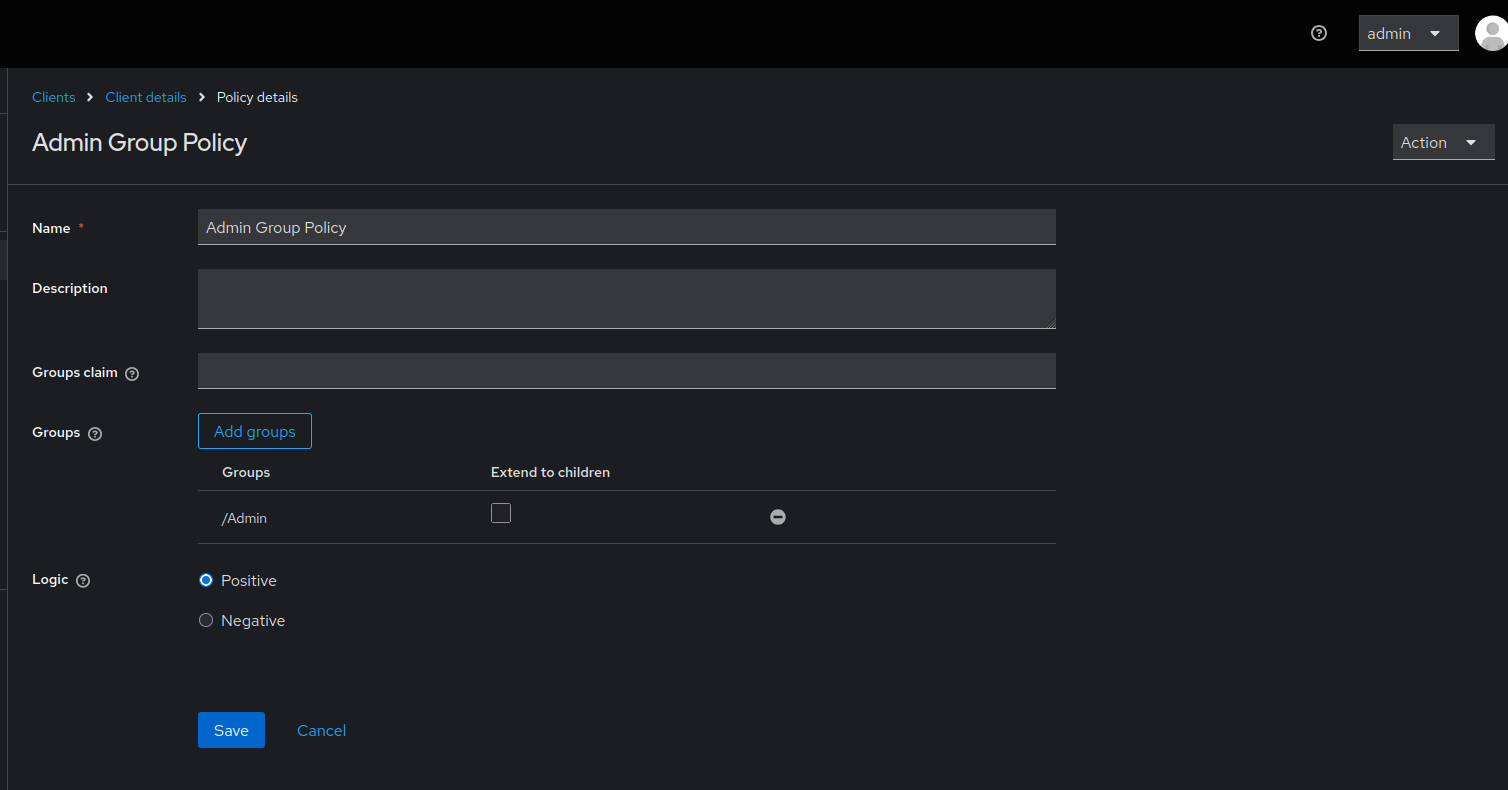
Client authorization settings showing scopes (GET, POST, PUT, DELETE) properly bound to resources, and group policies correctly referencing the Employee/Admin group structure.
5. Authorization Configuration Patterns
Pattern 1: REST API Protection
{
  "clients": [
    {
      "clientId": "api-backend",
      "authorizationServicesEnabled": true,
      "authorizationSettings": {
        "policyEnforcementMode": "ENFORCING",
        "scopes": [
          { "name": "read" },
          { "name": "write" },
          { "name": "delete" }
        ],
        "resources": [
          {
            "name": "User Resource",
            "type": "urn:api:resources:user",
            "uris": ["/api/users/*"],
            "scopes": [
              { "name": "read" },
              { "name": "write" },
              { "name": "delete" }
            ]
          },
          {
            "name": "Product Resource",
            "type": "urn:api:resources:product",
            "uris": ["/api/products/*"],
            "scopes": [
              { "name": "read" },
              { "name": "write" }
            ]
          }
        ],
        "policies": [
          {
            "name": "Admin Role Policy",
            "type": "role",
            "logic": "POSITIVE",
            "config": {
              "roles": "[{\"id\":\"admin\",\"required\":true}]"
            }
          },
          {
            "name": "User Read Permission",
            "type": "scope",
            "logic": "POSITIVE",
            "decisionStrategy": "UNANIMOUS",
            "config": {
              "resources": "[\"User Resource\"]",
              "scopes": "[\"read\"]",
              "applyPolicies": "[\"Admin Role Policy\"]"
            }
          }
        ]
      }
    }
  ]
}
Pattern 2: Group-Based Access Control
{
  "realm": "corporate",
  "groups": [
    {
      "name": "Engineering",
      "subGroups": [
        { "name": "Backend" },
        { "name": "Frontend" },
        { "name": "DevOps" }
      ]
    },
    {
      "name": "Management"
    }
  ],
  "clients": [
    {
      "clientId": "internal-app",
      "authorizationServicesEnabled": true,
      "authorizationSettings": {
        "policyEnforcementMode": "ENFORCING",
        "scopes": [
          { "name": "view" },
          { "name": "edit" },
          { "name": "approve" }
        ],
        "resources": [
          {
            "name": "Code Repository",
            "type": "urn:app:resources:repo",
            "uris": ["/repos/*"],
            "scopes": [
              { "name": "view" },
              { "name": "edit" }
            ]
          }
        ],
        "policies": [
          {
            "name": "Engineering Group Policy",
            "type": "group",
            "logic": "POSITIVE",
            "config": {
              "groups": "[{\"path\":\"/Engineering\",\"extendChildren\":true}]"
            }
          },
          {
            "name": "Management Group Policy",
            "type": "group",
            "logic": "POSITIVE",
            "config": {
              "groups": "[{\"path\":\"/Management\",\"extendChildren\":false}]"
            }
          },
          {
            "name": "Repository Access Permission",
            "type": "resource",
            "logic": "POSITIVE",
            "config": {
              "resources": "[\"Code Repository\"]",
              "applyPolicies": "[\"Engineering Group Policy\",\"Management Group Policy\"]"
            }
          }
        ]
      }
    }
  ]
}
Pattern 3: Time-Based and Aggregate Policies
{
  "clients": [
    {
      "clientId": "secure-app",
      "authorizationServicesEnabled": true,
      "authorizationSettings": {
        "policyEnforcementMode": "ENFORCING",
        "scopes": [
          { "name": "access" }
        ],
        "resources": [
          {
            "name": "Sensitive Data",
            "type": "urn:app:resources:sensitive",
            "uris": ["/sensitive/*"],
            "scopes": [{ "name": "access" }]
          }
        ],
        "policies": [
          {
            "name": "Admin Role Policy",
            "type": "role",
            "logic": "POSITIVE",
            "config": {
              "roles": "[{\"id\":\"admin\",\"required\":true}]"
            }
          },
          {
            "name": "Business Hours Policy",
            "type": "time",
            "logic": "POSITIVE",
            "config": {
              "hour": "9",
              "hourEnd": "17",
              "dayMonth": "",
              "dayMonthEnd": "",
              "month": "",
              "monthEnd": "",
              "year": "",
              "yearEnd": ""
            }
          },
          {
            "name": "Secure Access Policy",
            "type": "aggregate",
            "logic": "POSITIVE",
            "decisionStrategy": "UNANIMOUS",
            "config": {
              "applyPolicies": "[\"Admin Role Policy\",\"Business Hours Policy\"]"
            }
          },
          {
            "name": "Sensitive Data Permission",
            "type": "resource",
            "logic": "POSITIVE",
            "config": {
              "resources": "[\"Sensitive Data\"]",
              "applyPolicies": "[\"Secure Access Policy\"]"
            }
          }
        ]
      }
    }
  ]
}
6. Policy Types
Available Policy Types
| Type | Description | Use Case |
|---|---|---|
role |
Role-based access | Users with specific roles |
group |
Group membership | Users in specific groups |
user |
Specific users | Individual user access |
client |
Client-based | Service-to-service |
time |
Time-based | Business hours access |
aggregate |
Combine policies | Complex rules |
js |
JavaScript rules | Custom logic |
Group Policy Configuration
{
  "name": "Department Access Policy",
  "type": "group",
  "logic": "POSITIVE",
  "decisionStrategy": "UNANIMOUS",
  "config": {
    "groups": "[{\"path\":\"/Company/Engineering\",\"extendChildren\":true}]"
  }
}
Configuration options:
- path: Full group path (e.g., /Parent/Child)
- extendChildren: true includes subgroups, false only exact group
Role Policy Configuration
{
  "name": "Admin Access Policy",
  "type": "role",
  "logic": "POSITIVE",
  "config": {
    "roles": "[{\"id\":\"admin\",\"required\":true},{\"id\":\"manager\",\"required\":false}]"
  }
}
Configuration options:
- id: Role name
- required: true (must have), false (optional)
Time Policy Configuration
{
  "name": "Business Hours Only",
  "type": "time",
  "logic": "POSITIVE",
  "config": {
    "hour": "9",
    "hourEnd": "17",
    "dayMonth": "1",
    "dayMonthEnd": "31",
    "month": "1",
    "monthEnd": "12"
  }
}
7. Common Pitfalls
1. Scopes Not Defined Before Resources
Problem (Old versions):
{
  "authorizationSettings": {
    "resources": [
      {
        "name": "API",
        "scopes": [{ "name": "read" }]
      }
    ],
    "scopes": [
      { "name": "read" }
    ]
  }
}
Error: Scope 'read' not found or HTTP 403 Forbidden
Solution: Upgrade to v6.4.1+ where scopes are automatically created first.
2. Group Path Incorrect
Problem:
Error: Group not found
Solution: Use absolute path with leading slash:
3. JSON Escaping in Config
Problem:
Error: JSON parsing error
Solution: Properly escape quotes:
4. Groups Not Created Before Policies
Problem:
{
  "clients": [
    {
      "authorizationSettings": {
        "policies": [
          {
            "type": "group",
            "config": {
              "groups": "[{\"path\":\"/Admins\"}]"
            }
          }
        ]
      }
    }
  ],
  "groups": [
    { "name": "Admins" }
  ]
}
Solution: Define groups before clients:
{
  "groups": [
    { "name": "Admins" }
  ],
  "clients": [
    {
      "authorizationSettings": {
        "policies": [...]
      }
    }
  ]
}
5. Missing Authorization Services Flag
Problem:
Error: Authorization settings ignored
Solution:
{
  "clientId": "my-client",
  "authorizationServicesEnabled": true,
  "authorizationSettings": {
    "scopes": [...]
  }
}
8. Best Practices
-
Always Define Groups First
-
Use Descriptive Names
-
Enable Authorization Services
-
Use Absolute Group Paths
-
Test Permissions
After import, test permissions via Admin Console or API.
- Use Policy Enforcement Mode
Options: ENFORCING, PERMISSIVE, DISABLED
- Document Authorization Rules
Maintain clear documentation of your authorization model.
- Version Control Authorization Settings
Track changes to authorization policies in git.
9. Troubleshooting
Scopes Not Bound to Resources
Symptom: Resources created but scopes not associated
Diagnosis:
Check in Admin Console: - Clients → Select client → Authorization → Resources - Check if scopes are listed for each resource
Solution: Upgrade to v6.4.1+ or manually bind scopes in Admin Console.
Group Policy Not Working
Symptom: Users in group still denied access
Diagnosis:
- Verify group path is correct (with leading
/) - Check if
extendChildrenis set correctly - Verify users are actually in the group
Solution:
HTTP 403 on Permission Evaluation
Symptom: Permission checks fail with 403
Cause: Import order issue in older versions
Solution: Upgrade to v6.4.1+ where import order is fixed.
Permissions Not Applied
Symptom: Policies exist but permissions don't work
Diagnosis: Check if permission references correct resources and policies
Solution:
{
  "name": "Resource Permission",
  "type": "resource",
  "config": {
    "resources": "[\"Resource Name\"]",
    "applyPolicies": "[\"Policy Name\"]"
  }
}
10. Configuration Options
# Standard import
--import.files.locations=authorization-config.json

# Validate before import
--import.validate=true

# Remote state tracking
--import.remote-state.enabled=true
11. Testing Authorization
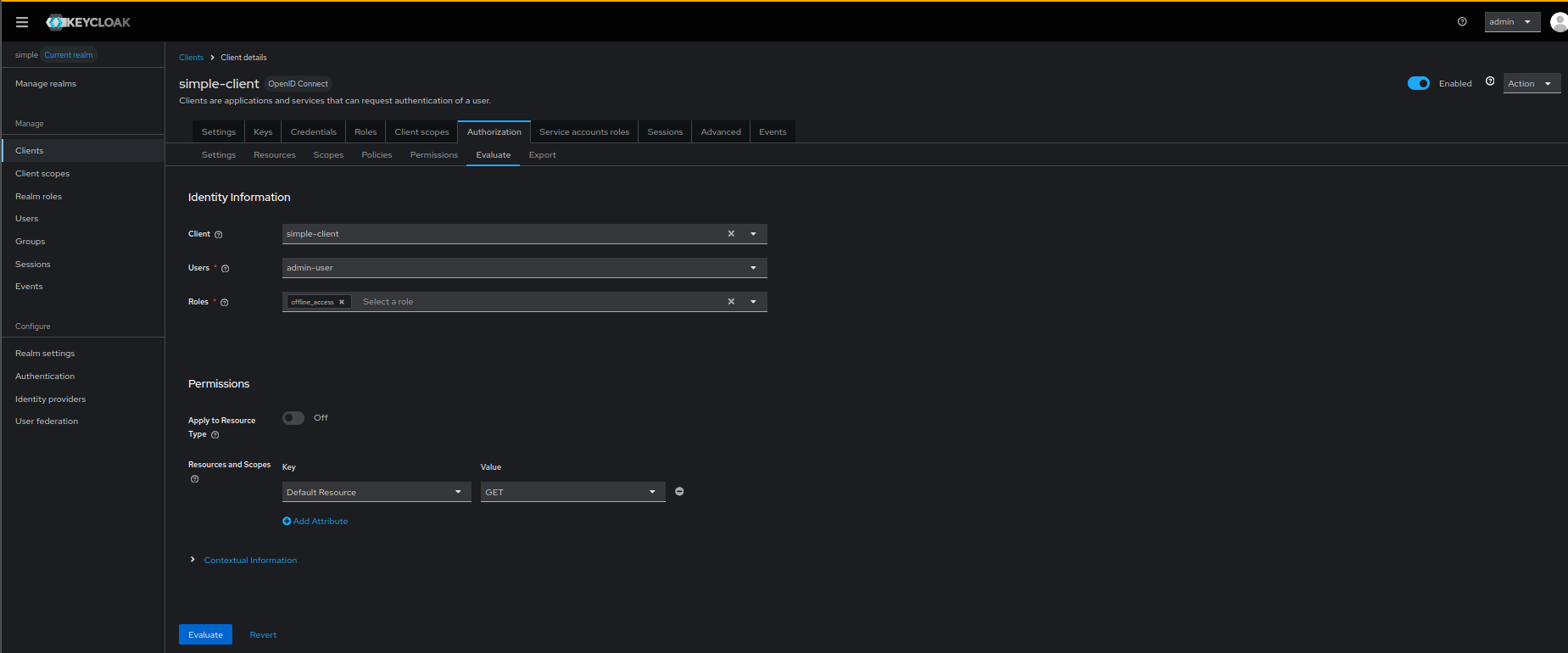
Test Permission via Admin Console
- Clients → Select client → Authorization → Evaluate
- Select user
- Select resource
- Click "Evaluate"
Evaluating Permissions in Admin Console:
Test via API
# Get token
TOKEN=$(curl -X POST "http://localhost:8080/realms/simple/protocol/openid-connect/token" \
  -d "client_id=simple-client" \
  -d "client_secret=nv6V42dsKJNotHereMyFriendmzZqabcd" \
  -d "grant_type=client_credentials" | jq -r '.access_token')

# Request permission
curl -X POST "http://localhost:8080/realms/simple/protocol/openid-connect/token" \
  -H "Authorization: Bearer $TOKEN" \
  -d "grant_type=urn:ietf:params:oauth:grant-type:uma-ticket" \
  -d "audience=simple-client"
12. Consequences
When configuring client authorization:
- Import Order Matters: In v6.4.0 and earlier, manual order adjustment needed
- Fixed in v6.4.1+: Automatic correct import order
- Groups Must Exist: Groups must be created before group policies
- Scopes Before Resources: Scopes must exist before resources can bind to them
- Testing Required: Always test authorization after import
- Version Dependency: Use v6.4.1+ for automatic correct ordering