Java Integration
Java integration in variable substitution allows you to access Java constants and version information, enabling dynamic configuration based on Java runtime environment and standard library values.
Overview
Java integration enables you to: - Access Java constants from standard library classes - Retrieve Java version information - Use Java system properties - Reference static final fields from Java classes
Java Constants
Basic Java Constant Access
Access static final fields from Java classes:
{
  "realm": "$(const:java.awt.event.KeyEvent.VK_ESCAPE)",
  "attributes": {
    "escape_key": "$(const:java.awt.event.KeyEvent.VK_ESCAPE)"
  }
}
Syntax
Parameters:
- FULLY_QUALIFIED_CLASS_NAME - Complete Java class name including package
- FIELD_NAME - Name of the static final field
Common Java Constants
AWT Event Constants:
{
  "attributes": {
    "escape_key": "$(const:java.awt.event.KeyEvent.VK_ESCAPE)",
    "enter_key": "$(const:java.awt.event.KeyEvent.VK_ENTER)",
    "space_key": "$(const:java.awt.event.KeyEvent.VK_SPACE)"
  }
}
Character Constants:
{
  "attributes": {
    "separator": "$(const:java.io.File.separator)",
    "path_separator": "$(const:java.io.File.pathSeparator)"
  }
}
Math Constants:
{
  "attributes": {
    "pi": "$(const:java.lang.Math.PI)",
    "max_int": "$(const:java.lang.Integer.MAX_VALUE)",
    "min_int": "$(const:java.lang.Integer.MIN_VALUE)"
  }
}
Examples
Using file separator for cross-platform paths:
{
  "realm": "production",
  "attributes": {
    "config_path": "config$(const:java.io.File.separator)realm.json",
    "separator": "$(const:java.io.File.separator)"
  }
}
Using character encoding constants:
{
  "realm": "production",
  "attributes": {
    "encoding": "$(const:java.nio.charset.StandardCharsets.UTF_8)"
  }
}
Using time constants:
{
  "realm": "production",
  "attributes": {
    "milliseconds_per_second": "$(const:java.util.concurrent.TimeUnit.MILLISECONDS.convert(1,SECONDS))",
    "seconds_per_minute": "60"
  }
}
System Properties
Java System Properties
Access Java system properties (also available via $(sys:PROPERTY_NAME)):
{
  "realm": "production",
  "attributes": {
    "user_dir": "$(sys:user.dir)",
    "user_home": "$(sys:user.home)",
    "java_home": "$(sys:java.home)",
    "os_name": "$(sys:os.name)"
  }
}
Classpath Requirements
Available Classes
Java constants require the classes to be available on the classpath:
Standard Library Classes (Always Available):
- java.lang.* - Core language classes
- java.io.* - Input/output classes
- java.util.* - Utility classes
- java.nio.* - New I/O classes
- java.awt.* - AWT classes (if AWT is available)
- java.math.* - Mathematical classes
Third-Party Classes: - Must be on the classpath - May not be available in all environments - Use with caution
Custom Classes
To use custom classes, ensure they are on the classpath:
Add to classpath:
java -cp /path/to/custom.jar:keycloak-config-cli.jar \
  -jar keycloak-config-cli.jar \
  --import.files.locations=config.json
Classpath Security
Be careful with classpath: - Only add trusted JARs to classpath - Avoid loading arbitrary classes - Review third-party dependencies
Performance Considerations
Constant Access Overhead
- Minimal overhead: Direct field access is very fast
- No reflection overhead: Uses direct field access
- Cached values: Static final values are cached by JVM
Optimization Tips
- Use Standard Library: Prefer standard library classes
- Avoid Complex Lookups: Simple constant access is faster
- Cache Results: Cache constant values if used repeatedly
- Profile Usage: Profile constant access in large configurations
Complete Import Example
This example demonstrates Java integration by accessing Java constants and system properties in a Keycloak realm configuration.
Step 1: Create Realm Configuration
java-integration-realm.json
{
  "realm": "java-integration-realm-attrs",
  "displayName": "Java Integration Realm Attributes Test",
  "enabled": true,
  "attributes": {
    "escape_key": "$(const:java.awt.event.KeyEvent.VK_ESCAPE)",
    "enter_key": "$(const:java.awt.event.KeyEvent.VK_ENTER)",
    "file_separator": "$(const:java.io.File.separator)",
    "path_separator": "$(const:java.io.File.pathSeparator)",
    "pi": "$(const:java.lang.Math.PI)",
    "max_int": "$(const:java.lang.Integer.MAX_VALUE)",
    "min_int": "$(const:java.lang.Integer.MIN_VALUE)",
    "user_dir": "$(sys:user.dir)",
    "user_home": "$(sys:user.home)",
    "java_home": "$(sys:java.home)",
    "os_name": "$(sys:os.name)",
    "os_version": "$(sys:os.version)",
    "java_version": "$(sys:java.version)",
    "integration_type": "java-constants-test"
  },
  "roles": {
    "realm": [
      {
        "name": "user",
        "description": "Test user role"
      }
    ]
  },
  "users": [
    {
      "username": "java-test-user",
      "email": "java-test@example.com",
      "enabled": true,
      "firstName": "Java",
      "lastName": "Test",
      "realmRoles": ["user"],
      "credentials": [
        {
          "type": "password",
          "value": "JavaTest123",
          "temporary": false
        }
      ]
    }
  ]
}
Step 2: Run Import
java -jar keycloak-config-cli.jar \
  --keycloak.url=http://<keycloak-url> \
  --keycloak.user=<keycloak-user> \
  --keycloak.password=<keycloak-password> \
  --import.var-substitution.enabled=true \
  --import.files.locations=java-integration-realm.json
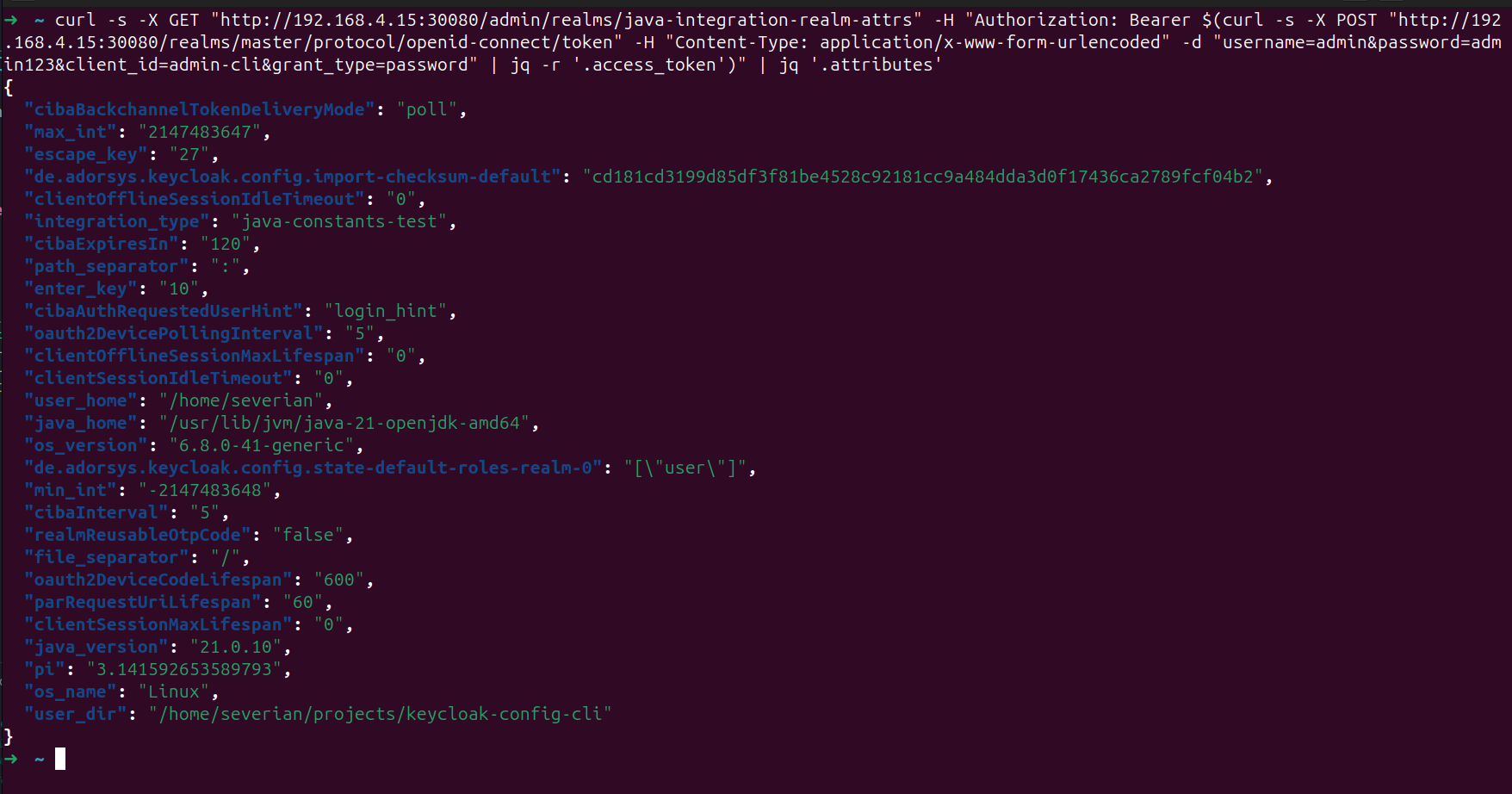
Step 3: Verify Results
Note: Realm attributes set programmatically may not be visible in the Keycloak Admin Console UI. Use the Keycloak Admin API to verify the attributes were set correctly.
Verify via API
Get admin access token
TOKEN=$(curl -s -X POST "http://<keycloak-url>/realms/master/protocol/openid-connect/token" \
  -H "Content-Type: application/x-www-form-urlencoded" \
  -d "username=<keycloak-user>&password=<keycloak-password>&client_id=admin-cli&grant_type=password" | jq -r '.access_token')
Get realm details with attributes
curl -s -X GET "http://<keycloak-url>/admin/realms/java-integration-realm-attrs" \
  -H "Authorization: Bearer $TOKEN" | jq '.attributes'
Expected Results
The API response should show the following attributes:
escape_key:27(VK_ESCAPE constant value)enter_key:10(VK_ENTER constant value)file_separator:/on Linux,\on Windowspath_separator::on Linux,;on Windowspi:3.141592653589793(Math.PI constant)max_int:2147483647(Integer.MAX_VALUE)min_int:-2147483648(Integer.MIN_VALUE)user_dir: Current working directory pathuser_home: User home directory pathjava_home: Java installation directoryos_name: Operating system name (e.g., "Linux")os_version: OS versionjava_version: Java runtime versionintegration_type:java-constants-test
Verify in UI
In the Keycloak Admin Console, verify:
- Realm name:
java-integration-realm-attrs - Display name:
Java Integration Realm Attributes Test - User:
java-test-usercreated successfully - Role:
userrole created
What This Demonstrates
- AWT Constants: Accessing keyboard event constants (VK_ESCAPE, VK_ENTER)
- File System Constants: Using platform-specific separators (File.separator, pathSeparator)
- Math Constants: Accessing mathematical constants (Math.PI, Integer.MAX_VALUE)
- System Properties: Retrieving Java system properties (user.dir, os.name, java.version)
- Cross-Platform Configuration: Using constants for platform-independent paths
- Runtime Environment Access: Getting Java runtime information
- Mixed Integration: Combining constants and system properties in one configuration
Notes
- AWT Availability: AWT constants may not be available in headless environments
- Platform Differences: File separators vary by operating system
- Java Version: System properties reflect the Java runtime version used
- Classpath: Only standard library classes are guaranteed to be available
- Performance: Constant access is very fast with minimal overhead
Complete Examples
Next Steps
- Overview - Variable substitution introduction
- Environment Variables - Environment variable access
- JavaScript Substitution - Advanced JavaScript evaluation