Post Logout Redirect URIs
Adding Multiple post.logout.redirect.uris in Keycloak Configuration.
To correctly import multiple post.logout.redirect.uris, you should use the ## separators to concatenate URIs into a single string. Here's a step-by-step guide on how to do this:
Open the Import File.
First, navigate to your JSON configuration file where the realm and clients are defined.
Add Multiple Values for post.logout.redirect.uris.
In the attributes section where you want to add multiple post.logout.redirect.uris, ensure that you use the ## separators. Here's an example configuration:
Here is the syntax:
"attributes": {
  "post.logout.redirect.uris": "https://app1.example.com/logout##https://app2.example.com/logout##https://app3.example.com/logout"
},
This is a simple JSON example that can be used to see how it works:
{
  "realm": "your-realm",
  "clients": [
    {
      "clientId": "your-client-id",
      "enabled": true,
      "redirectUris": [
        "https://app1.example.com/callback",
        "https://app2.example.com/callback",
        "https://app3.example.com/callback"
      ],
      "webOrigins": [
        "https://app1.example.com",
        "https://app2.example.com",
        "https://app3.example.com"
      ],
      "attributes": {
        "post.logout.redirect.uris": "https://app1.example.com/logout##https://app2.example.com/logout##https://app3.example.com/logout"
      },
      "protocol": "openid-connect",
      "publicClient": false,
      "standardFlowEnabled": true,
      "implicitFlowEnabled": false,
      "directAccessGrantsEnabled": true,
      "serviceAccountsEnabled": false,
      "authorizationServicesEnabled": false,
      "fullScopeAllowed": true
    }
  ]
}
In the above configuration, you specify multiple logout redirect URIs separated by ##.
Load the Configuration.
Once your configuration file is updated, load it into your Keycloak instance.
Verify in the Keycloak Admin UI.
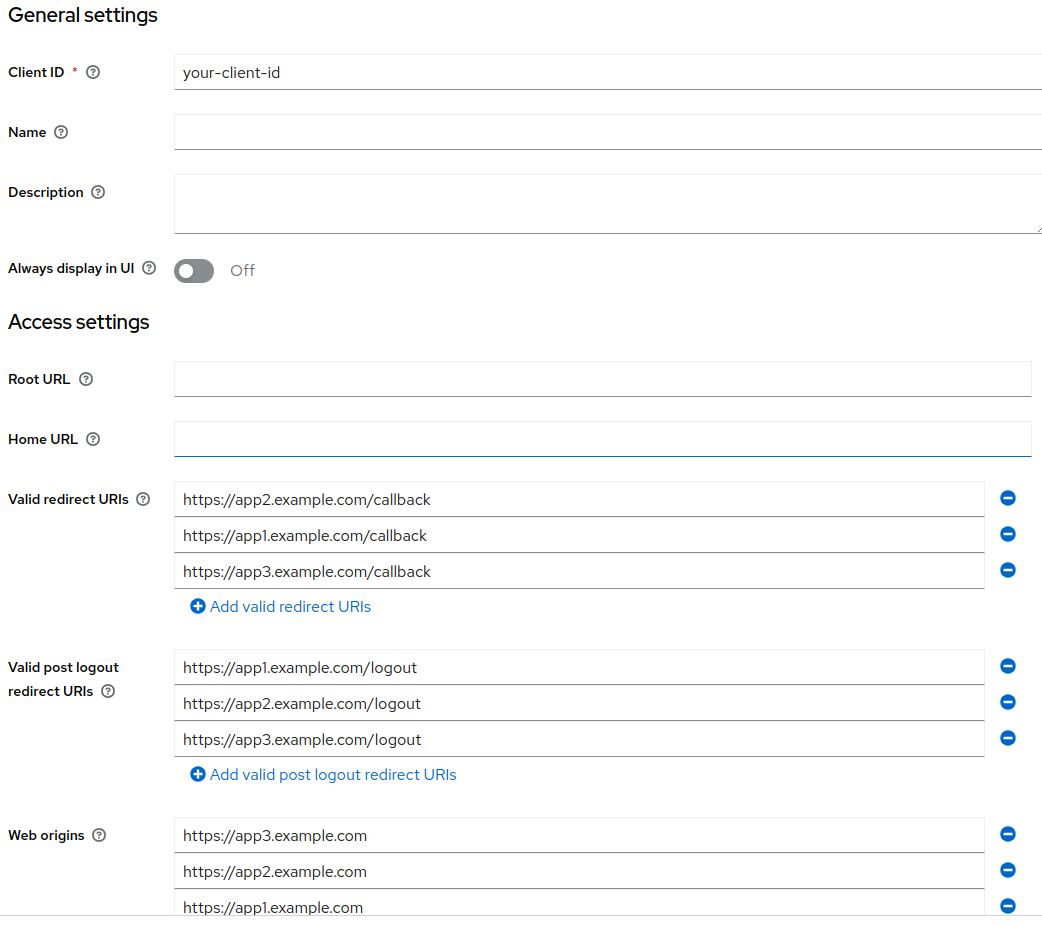
After loading the configuration, check the Keycloak Admin UI to verify that the post.logout.redirect.uris are correctly imported with multiple values. You should see the following URIs:
https://app1.example.com/logouthttps://app2.example.com/logouthttps://app3.example.com/logout
Troubleshooting
Common Error: Using Array Format
If you try to use an array format for post.logout.redirect.uris, you will encounter an error like:
Cannot deserialize value of type `java.lang.String` from Array value (token `JsonToken.START_ARRAY`)
Incorrect (will cause error):
Correct (use ## separator):
This is because Keycloak attributes are stored as strings, and multi-valued attributes use ## as the separator. See Keycloak's Constants.java for reference.
Using the + Wildcard
As a workaround, you can use + to allow all configured redirectUris as post-logout redirect URIs:
Note: This is only a workaround because post.logout.redirect.uris and redirectUris can be different.
Conclusion
By following the above steps, you can successfully add multiple post.logout.redirect.uris in your Keycloak configuration. This approach ensures that all specified URIs are respected during logout redirection processes.