Password Policy Configuration Issues
When configuring password policies in keycloak-config-cli, certain policy combinations can cause HTTP 400 Bad Request errors during import. This documentation explains the issue and provides workarounds.
The Problem
Users encounter HTTP 400 Bad Request errors when importing realm configurations with specific password policy combinations, particularly those containing:
passwordHistory(5)- Password history policyspecialChars(1)- Special characters requirement
Error Scenario:
{
  "realm": "secure-realm",
  "enabled": true,
  "passwordPolicy": "specialChars(1) and forceExpiredPasswordChange(365) and length(12) and lowerCase(1) and upperCase(1) and digits(1) and maxLength(128) and notUsername(undefined) and notEmail(undefined) and passwordHistory(5) and specialChars(1)"
}
Result: HTTP 400 Bad Request during import
Root Cause
The issue occurs when keycloak-config-cli attempts to create realms with complex password policy configurations in a single operation. The exact cause is related to how Keycloak handles password policy validation during realm creation versus updates.
Workaround: Split Configuration Files
The most reliable solution is to split the realm configuration into separate files and import them in sequence.
Step 1: Create Base Realm Configuration
File: 00_master-realm-config.json
{
  "realm": "secure-realm",
  "enabled": true,
  "passwordPolicy": "",
  "clients": [
    {
      "clientId": "example-client",
      "enabled": true,
      "clientAuthenticatorType": "client-secret",
      "secret": "your-client-secret",
      "redirectUris": ["https://your-app.example.com/*"],
      "webOrigins": ["https://your-app.example.com"]
    }
  ],
  "roles": {
    "realm": [
      {
        "name": "user",
        "description": "Default user role"
      }
    ]
  }
}
Step 2: Create Global Configuration
File: 00_master-realm-global.json
{
  "realm": "secure-realm",
  "enabled": true,
  "passwordPolicy": "length(12) and notEmail(undefined) and passwordHistory(3) and digits(1) and specialChars(1) and upperCase(1) and lowerCase(1) and notUsername(1)",
  "sslRequired": "external",
  "registrationAllowed": false,
  "registrationEmailAsUsername": false,
  "rememberMe": false,
  "verifyEmail": false,
  "loginWithEmailAllowed": true,
  "duplicateEmailsAllowed": false,
  "resetPasswordAllowed": false,
  "editUsernameAllowed": false,
  "bruteForceProtected": true,
  "permanentLockout": false,
  "maxFailureWaitSeconds": 900,
  "minimumQuickLoginWaitSeconds": 60,
  "waitIncrementSeconds": 60,
  "quickLoginCheckMilliSeconds": 1000,
  "maxDeltaTimeSeconds": 43200,
  "failureFactor": 10
}
Step 3: Import Configuration Files
Important: The second file must include the complete realm configuration, not just the password policy. Keycloak requires the full realm state when updating password policies.
# Import base realm configuration first
java -jar keycloak-config-cli.jar \
  --keycloak.url=http://localhost:8080 \
  --keycloak.user=admin \
  --keycloak.password=admin \
  --import.files.locations=00_master-realm-config.json

# Then import global configuration (executed last due to naming)
java -jar keycloak-config-cli.jar \
  --keycloak.url=http://localhost:8080 \
  --keycloak.user=admin \
  --keycloak.password=admin \
  --import.files.locations=00_master-realm-global.json
Import sequence showing successful execution:
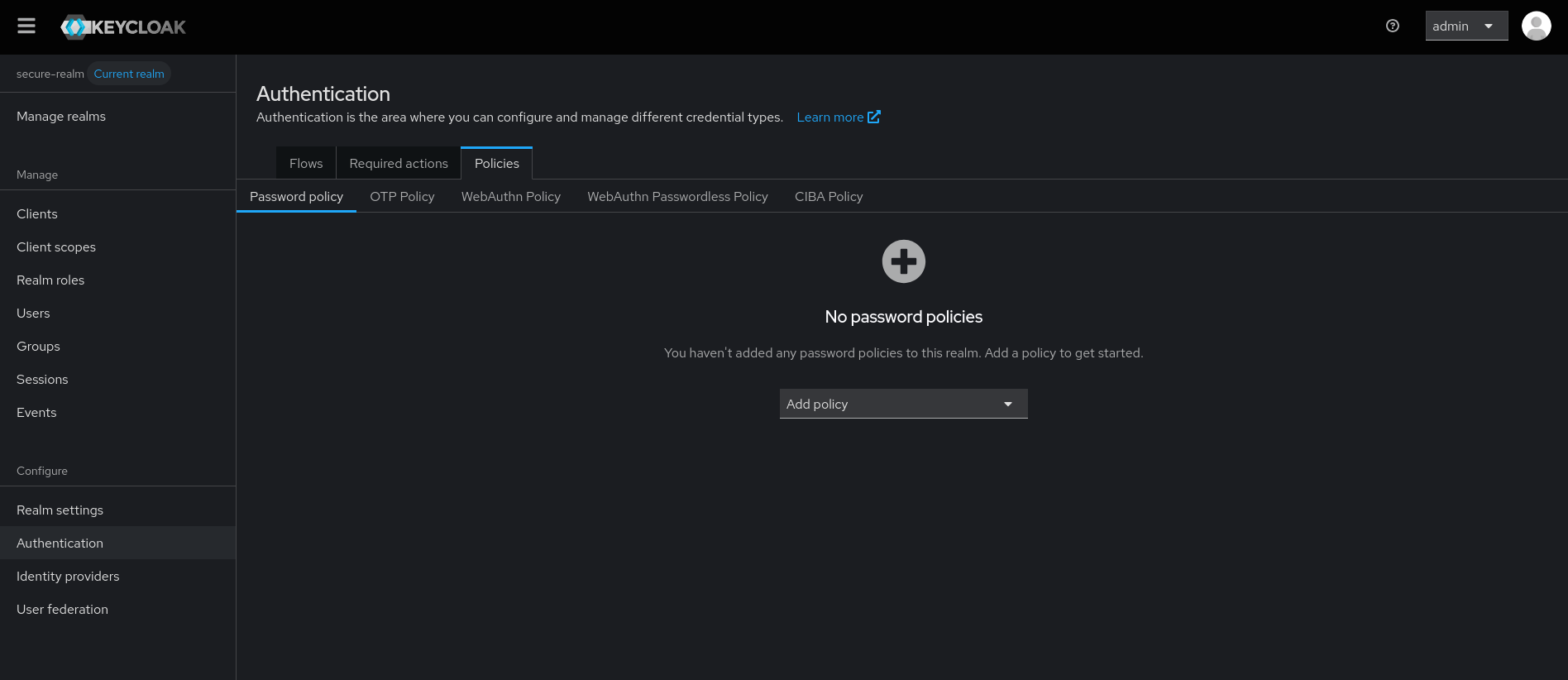
Base realm configuration imported successfully without password policy.
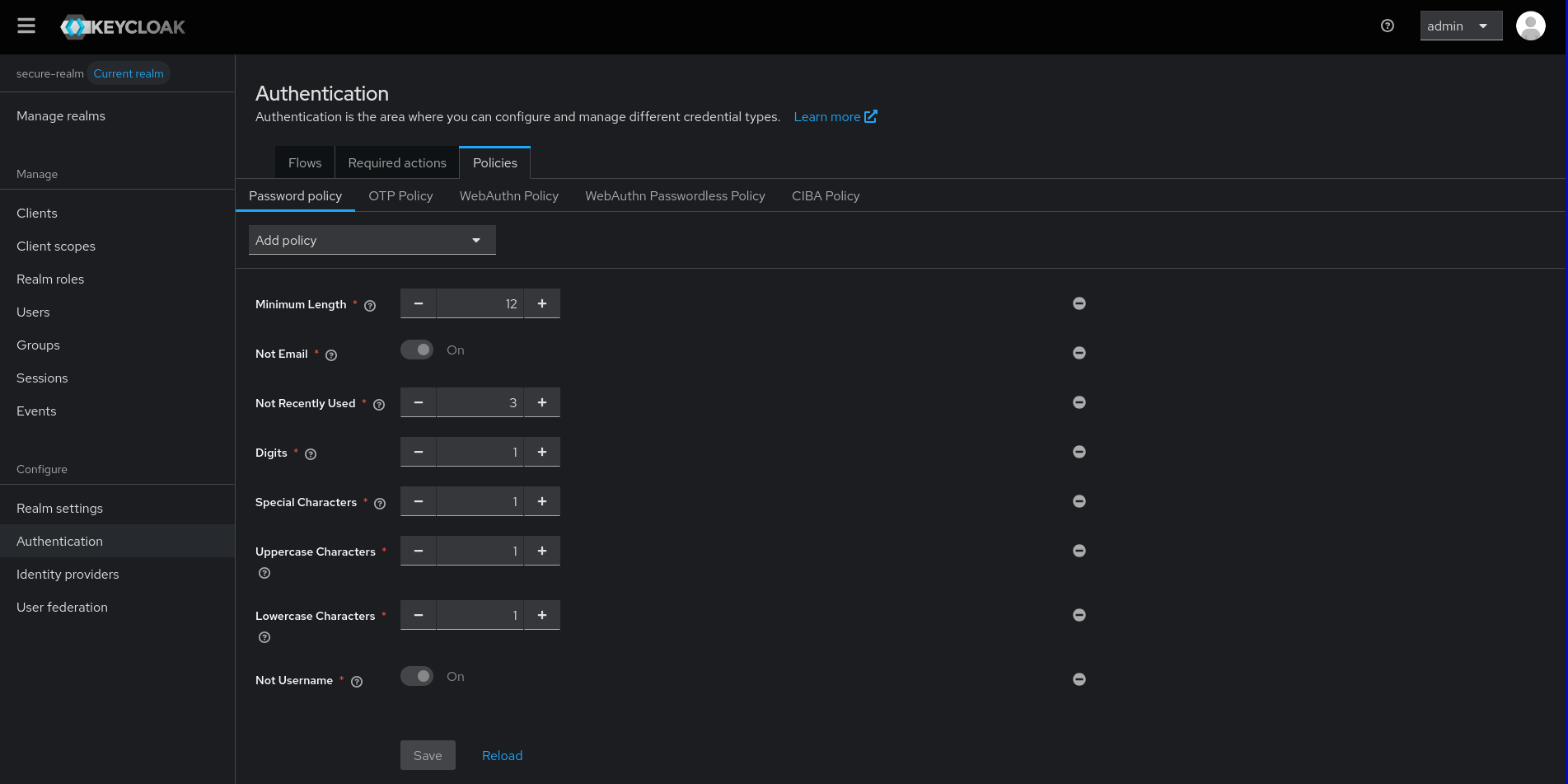
Password policy with complex requirements successfully configured using the split configuration approach.
Working Password Policy Examples
Simple Policies (Work in Single File)
{
  "realm": "test-realm",
  "enabled": true,
  "passwordPolicy": "length(12) and digits(1) and upperCase(1) and lowerCase(1)"
}
Complex Policies (Require Split Configuration)
{
  "realm": "test-realm",
  "enabled": true,
  "passwordPolicy": "length(12) and notEmail(undefined) and passwordHistory(3) and digits(1) and specialChars(1) and upperCase(1) and lowerCase(1) and notUsername(1)"
}
Best Practices
1. Use Split Configuration for Complex Policies
Always separate realm creation from password policy configuration when using:
- passwordHistory() policies
- specialChars() policies
- Multiple policy combinations
2. Follow Naming Convention
Use numeric prefixes to control import order:
- 00_*_config.json - Base realm configuration
- 00_*_global.json - Global settings including password policies
2.1. Include Complete Realm Configuration
Critical: The second import file must include the complete realm configuration, not just the password policy. Keycloak requires the full realm state when updating password policies.
3. Test in Development
Always test password policy configurations in development before production deployment.
Common Policy Combinations
Working Single-File Policies
length(12)length(12) and digits(1)length(12) and digits(1) and upperCase(1)length(12) and digits(1) and upperCase(1) and lowerCase(1)
Policies Requiring Split Configuration
- Any combination with
passwordHistory() - Any combination with
specialChars() - Complex policies with 5+ conditions
Version Compatibility
| Keycloak Version | keycloak-config-cli Version | Issue Status |
|---|---|---|
| 21.1.2+ | 5.8.0+ | Issue confirmed |
| 22.0.0+ | 6.0.0+ | Issue confirmed |
| 23.0.0+ | 6.5.0+ | Issue confirmed |
Note: This issue affects multiple versions. The split configuration workaround works across all affected versions.
Migration Guide
From Single-File to Split Configuration
- Identify problematic policies in your existing configuration
- Create base configuration without password policies
- Create global configuration with password policies
- Test import sequence in development
- Deploy to production with verified configuration
Example Migration
Before (problematic):
{
  "realm": "secure-realm",
  "enabled": true,
  "passwordPolicy": "length(12) and passwordHistory(5) and specialChars(1)"
}
After (working):
first import
second import
{
  "realm": "secure-realm",
  "enabled": true,
  "passwordPolicy": "length(12) and passwordHistory(5) and specialChars(1)"
}
Important: The second import must include the complete realm configuration, not just the password policy. Keycloak requires the full realm state when updating.
Summary
When working with complex password policies in keycloak-config-cli:
- Use split configuration for policies with
passwordHistory()orspecialChars() - Follow naming conventions to control import order
- Test thoroughly in development environments
This approach ensures reliable password policy configuration across different Keycloak and keycloak-config-cli versions.